
“WOW… What an improvement…”, was a comment from one of the Stakeholders. 😊
A client had a sales page that was sending people on a wild goose chase just to buy something. Let’s talk about how we fixed it.
What Was Wrong
Their checkout process was really cumbersome.
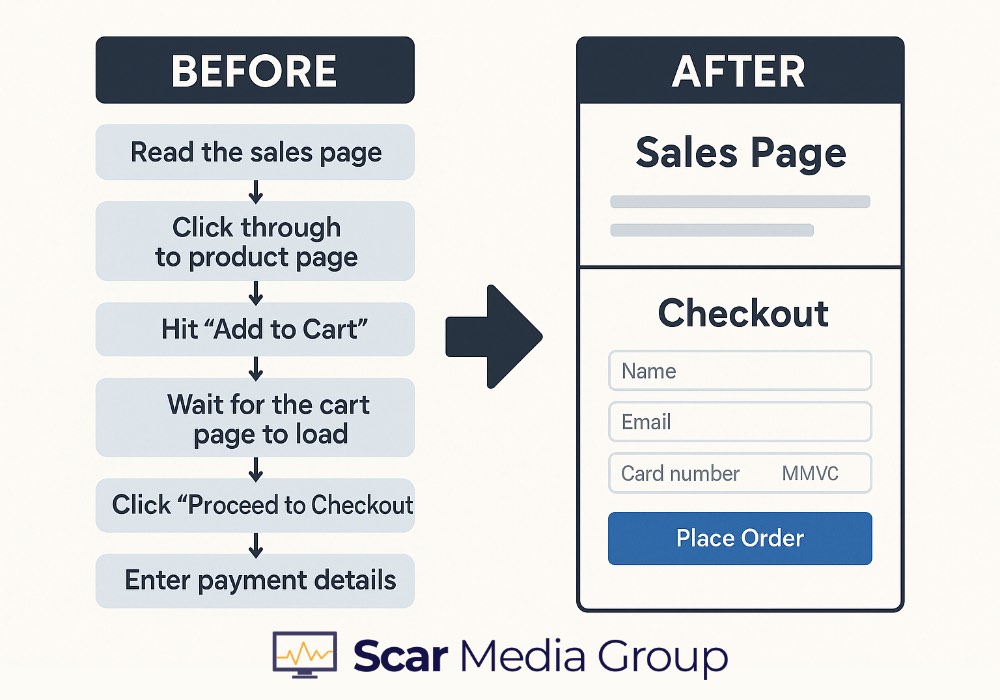
People had to:
- Read the sales page
- Click through to the WooCommerce product page
- Hit “Add to Cart”
- Wait for the cart page to load
- Click “Proceed to Checkout”
- Finally get to enter their payment details
Six steps just to hand over money. Every extra click is another chance for someone to bail out or get distracted.
What We Ended Up With – (see how we did it, below)
The purchase process went from 6 steps down to 2:
- Read sales page
- Complete checkout on same page
Pretty straightforward now.
✅ Way fewer clicks to purchase
✅ Fewer opportunities to abandon the cart
✅ Cleaner, more professional look
✅ Better conversion potential
✅ Smoother mobile experience
How We Did It
We embedded the checkout form right into the sales page. Scroll down, fill it in, buy it. Done.
(opens in new tab)

The Technical Bits:
Getting this working took a few moving parts:
Custom Checkout Shortcode: We built a shortcode that programmatically adds the product to the cart and renders the checkout form directly on the sales page. This completely bypasses the #ooCommerce product page and cart page nonsense.
The shortcode handles the whole flow: it grabs the product ID, adds it to the WooCommerce session, and spits out the checkout form right there. No redirects, no extra page loads.
Cart Management: Had to write some custom logic to:
- Clear out any existing cart items when the sales page loads (stops weird cart conflicts)
- Add only the specific product tied to that sales page
- Prevent other products from sneaking into the checkout
- Make sure WooCommerce sessions behaved properly
The tricky bit here was timing. You need to hook into WooCommerce early enough to manipulate the cart before the checkout form renders, but not so early that session data isn’t available yet.
Checkout Form Tweaks: Modified the WooCommerce checkout template so it plays nice within the sales page layout. Had to make sure:
- All the validation still works (required fields, email format, etc.)
- Security features stay intact (nonces, CSRF protection)
- Payment gateways process normally
- Everything looks decent on mobile
We used WooCommerce template overrides rather than hacking core files, so updates won’t break things later.
Checkout not converting?
We clean up WooCommerce checkout issues and make buying easier.
Get it checked or start a live chat if it’s urgent.
Sales Page Redesign: Restructured the page layout so the checkout form sits naturally after the sales copy. You want it to feel like a logical next step, not like someone just dumped a form at the bottom.
Had to balance persuasive copy with a functional checkout area. Too much clutter and people get overwhelmed. Too sparse and they wonder if something’s missing.
Technical Stuff Worth Mentioning:
Session Handling: WooCommerce sessions can be finicky. We had to make sure cart data persisted correctly between page loads and didn’t conflict with other site functionality.
Used WC()->session properly and made sure we weren’t creating multiple session instances that would cause data loss.
Product Isolation: Wrote logic to ensure only the designated product appears in checkout. This prevents confusion if someone’s been browsing other products or has stuff lingering in their cart from days ago.
Basically: when you land on the sales page, we wipe the cart and add just that one product. Clean slate every time.
Payment Gateway Testing: Tested in Stripe to make sure everything processed payments exactly like standard WooCommerce.
The custom setup can’t mess with how payments get handled or you’ll have angry customers and refund/charge-back headaches.
Security: Kept all WooCommerce security intact. All the nonce verification, data sanitisation, and form validation stayed in place.
Never sacrifice security for convenience. Just don’t.
When This Approach Works Best
This setup works really well for:
- Single product sales pages
- High-value digital products or courses
- Membership sales
- Landing pages from ad campaigns
- Anywhere you need minimal purchase friction
You’re getting all the WooCommerce functionality (order management, payment processing, customer accounts) with a much better user experience and fewer conversion barriers.
The key is matching the technical solution to the business goal: make it dead simple for someone to buy when they’re ready.